| The Fitness Function Tab gives access to the
following settings and features:
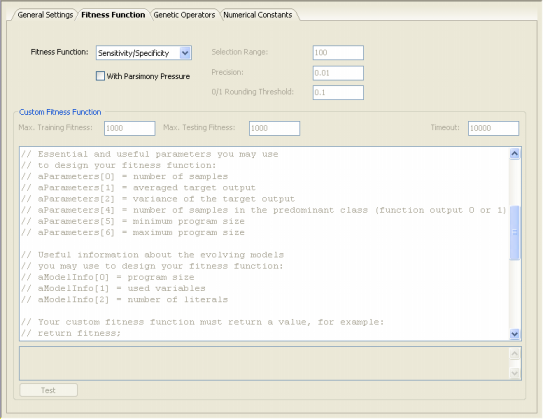
Fitness Function
Here you select either one of the 30 basic built-in fitness functions of
GeneXproTools 4.0 for Classification problems or a custom fitness
function.
With Parsimony Pressure Check Box
By checking this box, you select a fitness function with parsimony
pressure.
Selection Range
This box is specific of Function Finding and Time Series
Prediction problems, and therefore is
disabled in Logic Synthesis.
Precision
This box is specific of Function Finding and Time Series
Prediction problems, and therefore is
disabled in Logic Synthesis.
0/1 Rounding Threshold
This box is specific of Classification problems, and therefore is
disabled in Logic Synthesis.
Custom Fitness Function Frame
Select Custom in the Fitness Function combo box in order to activate this frame. You can now design or edit your own fitness function.
Custom Fitness Function Code Window
You design or edit the code of your own fitness function in the code window. The code must be in Java Script and can be tested for syntax errors before evolving models with it.
Test
Tests the syntax of the Java Script code of your fitness function for syntax errors. The results of the test are written in the gray window below the code window.
Max. Training Fitness
The maximum fitness corresponding to the custom fitness function on the training set. If maximum fitness depends on the number of training samples, don’t forget to update this value every time you change the number of training samples, otherwise you might be creating some inaccuracies or errors. For instance, the plot
of the Evolutionary Dynamics on the Run Panel won’t show correctly if your maximum fitness is not correctly set.
Max. Testing Fitness
The maximum fitness corresponding to the custom fitness function on the testing set. If maximum fitness depends on the number of testing samples, don’t forget to update this value every time you change the number of testing samples, otherwise you might be creating some inaccuracies.
Timeout
Despite one’s best efforts, the code one sometimes writes contains errors that keep computers in infinite loops. This setting gives you a gracious way out of such loops.
|